
Does Your Shopify AI Assistant Know Which Product the Shopper Is Looking At?
On a product page the most common questions are the shortest: “Is this in stock?”, “Does it run small?”, “Add it.” Here is what page context means, where assistants get it wrong, and a 10-minute test for any Shopify chatbot.
A shopper on a product page rarely types the product's name. They type “Is this in stock?”, “Does it run small?”, “Is this one OK for a beginner?” or just “Add it.” Every one of those questions points at the page: this product, in the color they just picked, from the collection they came through, next to what is already in their cart.
An AI assistant that cannot see the page has to guess what “this” means, or ask the shopper to spell it out. Either way, the shopper is a step further from checkout at the moment they were closest to it. This guide explains what page context is, the five ways Shopify assistants get product pages wrong, and a 10-minute test you can run on any chatbot before you keep it on your store.
What page context means on a Shopify store
| Context | What the assistant should know | Questions it makes answerable |
|---|---|---|
| Page type | Home, collection, product, cart or search | What kind of help fits right now |
| Product | Title, price, description, availability | “Is this waterproof?” “What does it cost?” |
| Selected variant | The color, size or material picked on the page | “Is this one in stock?” “Add it to my cart.” |
| Collection | The collection the shopper is browsing | “Anything like this but cheaper?” |
| Cart | What is already in the cart | “Does this go with what I have?” |
Context does not replace your catalog. The assistant still needs live stock, prices and policies from your store. Context tells it which product and variant the shopper means, so it looks in the right place first.
Five ways assistants get product pages wrong
1. A generic opener
“Hi! How can I help?” on a product page wastes the first message. An assistant that knows the page can name the product and offer the decisions shoppers usually face there: fit, a comparison, or buying now.
2. Making the shopper repeat themselves
If the shopper has to type the product name, the assistant is making them do its job, right when they are closest to buying.
3. Answering about a different product
Search-based assistants look up the words in the message. “Is this too expensive?” contains no product words, so the search returns other items, and the assistant may answer about one of them or even claim that the product on the page is not in your catalog. The product on the page has to be in context on every turn, whatever the message says.
4. A stale variant
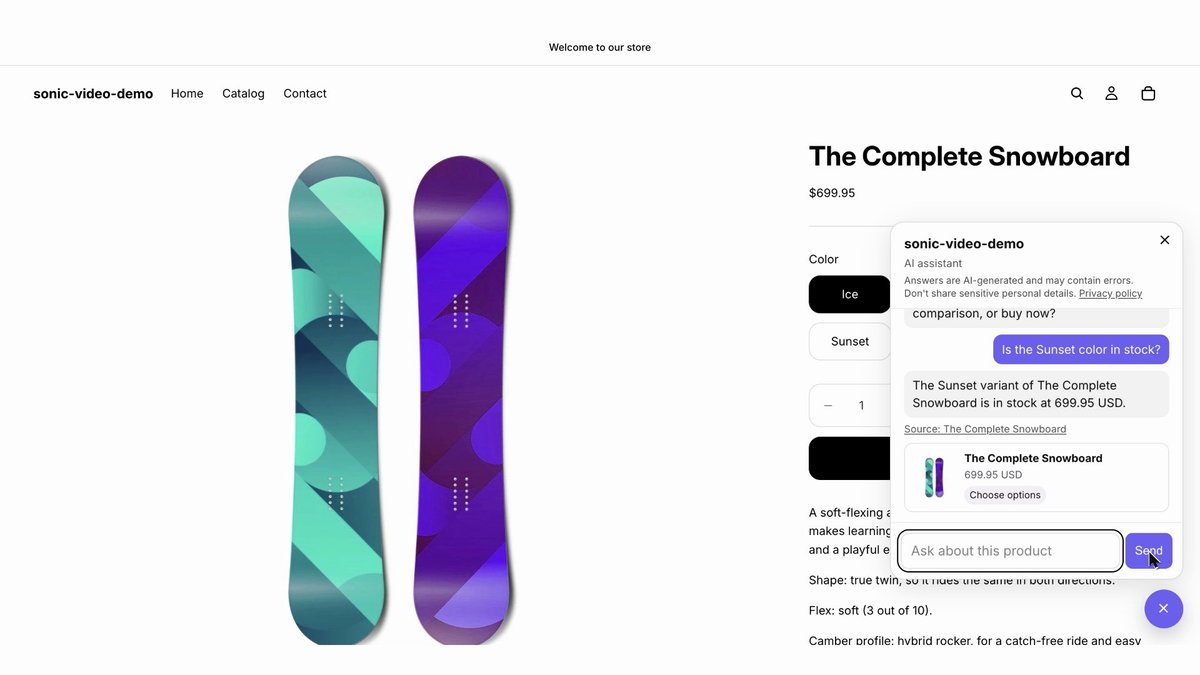
Most Shopify themes switch variants without reloading the page. The shopper clicks “Sunset”, the photo and price change, and the address bar gets a new `?variant=` value. An assistant that read the page once, when it loaded, still thinks the shopper is looking at the first color. Ask “Is this one in stock?” and it answers about another variant. Say “Add it to my cart” and the wrong color goes in, which comes back later as a return or an exchange.
5. Filling gaps with guesses
When a detail is not in your product data, such as the exact weight, the material or whether an item is original, an assistant without guardrails fills the gap from general knowledge. On your product page, that reads like a promise from your store. A good sales assistant says it does not have that detail and offers a next step: the size guide, your contact page, or one question that helps.
A 10-minute product-page test for any Shopify chatbot
Open a product with at least two colors or sizes and go through these steps in order:
- Open the chat. Does the first message name the product?
- Ask “Is this in stock?” without naming it. The answer should be about this product.
- Pick another variant without reloading, then ask “And this one?” The answer should be about the variant you picked.
- Ask “Anything cheaper than this?” The suggestions should cost less than this product.
- Say “Add it to my cart.” Open the cart and check the variant.
- Ask about a detail your page does not state. The assistant should say it does not know rather than invent an answer.
- Ask “Where is my order?” A sales assistant should hand this to your support or contact page instead of improvising.
- Repeat on a collection page and the cart page. The help should change with the page.
An assistant that fails steps 2, 3 or 5 is failing where shoppers are closest to buying.
Why it matters
A question on a product page is often the last thing between a shopper and the cart. Each extra step, such as retyping the product name, correcting the assistant or removing the wrong variant from the cart, adds friction at exactly that moment. Wrong-variant adds also create work after the sale: exchanges, returns and support tickets.
Page context is also what keeps answers short. When the assistant knows the product and the variant, “Yes, Sunset is in stock at $699.95” is a complete answer.
How Sonic Prospect for Shopify handles it
Sonic Prospect for Shopify is an AI sales agent for Shopify product, collection and cart pages. With every message, it sends the agent the page the shopper is on:
- The product and the selected variant, read from your theme. When a shopper changes the color or size without reloading, the next answer and “add it to my cart” use the new selection, on themes that update the page address when an option changes, such as Dawn and Horizon.
- Live catalog data. The product on the page is always in context, with stock and price read from your store at the time of the question, including the selected variant on products with many variants.
- The collection and the cart, so “something like this but cheaper” and “does this go with what I have?” have an anchor.
- Only your store's content. Answers come from your products, pages, policies and the files you upload, with the source shown. If a detail is not there, the agent says so.
- Pre-purchase focus. Questions about existing orders get a “Talk to the store” path to your contact page.
- Your choice of pages. In Settings you choose the page types where the chat appears.
There is no subscription. You pay 3.5% of orders placed within 72 hours after a helpful chat, capped at $25 per order, with no commission on your first $500 of those orders. Billing runs through Shopify. Sonic Prospect for Shopify is in Shopify App Store review: join early access to get the install link when it is listed.
For a comparison of Shopify sales chatbots and how they charge, see Best AI sales chatbot for Shopify.
Frequently asked questions
Can a Shopify chatbot see which product a customer is viewing?
It can if it reads the page from your theme. An app embed can pass the product, the selected variant, the collection and the cart to the assistant with every message. Test it by asking “Is this in stock?” on a product page without naming the product.
What happens when a shopper changes the variant without reloading the page?
Most Shopify themes update the product photo, price and page address without a reload. An assistant that read the page only when it loaded keeps answering about the first variant. Sonic Prospect for Shopify reads the selected variant from the page address with every message, on themes that update it when an option changes, such as Dawn and Horizon.
Does page context replace the product catalog?
No. Context tells the assistant which product and variant the shopper means. Stock, prices and policies should still come from your store’s live data at the time of the question.
Will an AI shopping assistant make up stock or prices?
A well-built sales assistant answers only from your store’s data and says when a detail is missing. Check it by asking about something your product page does not state.
See root causes on your own feedback
Book a 15-minute demo, or get a free RCA in 48 hours with no sales call.